
Audio Related Topics
Showing topics in The Welcome Shop (Please read first), Website Support, Media, Pure digital, Physical digital, Vinyl, Words, media DIY, Movies, Music, Favorite songs to X by, Music Games, Loudspeakers and Loudspeaker repair posted in for the last 365 days.
- Past hour
-
@Ray Cole, your owners manual is still available on Crutchfield.com in the drop-down for "What's in the Box" on the page you shared. Here's the direct link to the PDF of the owner's manual. https://pdf.crutchfieldonline.com/ImageBank/v20060406130800/Manuals/602/602SUS100B.PDF It includes diagrams. And from the specs, I see it only accepts LINE LEVEL (or LOW LEVEL) input - NOT speaker level - so you want to get an RCA Y-cable to split the pre-out, one "y" goes goes directly back into where the U-Jumper pulled out of, and the other "Y" goes to the RCA input of your sub. Examine the last diagram on page 5. You'll want to consider (map out) the female, mail connections for the Y cable, and for the joining cable to the sub. But from here you should be good to go - and yes, sketching it out helps before you buy a bunch of y-cables and RCA cables on Amazon... Hope that helps you.
-
Thanks for the welcome and the photo with the jumpers circled! Unfortunately, the sub is pretty old and I don't have an owner's manual for it. Will search online and see if I can track one down. I think the y-cable solution is likely the best option, but if I can find a manual for the sub, I will see what it suggests.
-
Thanks Andrew! A y-cable might be just the thing. My sub has no speaker-level inputs, so that top diagram won't work in my case, but an RCA Y-cable might.
-
Sk1Bum, thanks for the welcome! The sub is a little Soundmatters SubStation. It is a fairly minimal powered subwoofer. For inputs is has either a 1/8-inch minijack or RCA mono in. There's a dial for setting the crossover from 60 to 200 Hz, and a phase dial and a power on/off switch. That's about it. It has no speaker terminals. Can't find much info about it as they aren't sold anymore, but here's the Crutchfield page for it: https://www.crutchfield.com/S-6rlJVtlWhRi/p_602SUS100B/Soundmatters-SUBstage.html
- Today
-
i should add, also, that I'm assuming that your subwoofer is a powered subwoofer (has an internal plate amp). here's a diagram for a SPEAKER LEVEL or often called HIGH LEVEL method of connecting a subwoofer to the speaker outputs on your receiver. For a y-cable, using the PRE-OUTS, the best diagram I could come up with on the internet is this one..., (again, a better one might be in your subwoofer manual.) but in this figure, consider that the y cable would be in the Preamplifier...
-
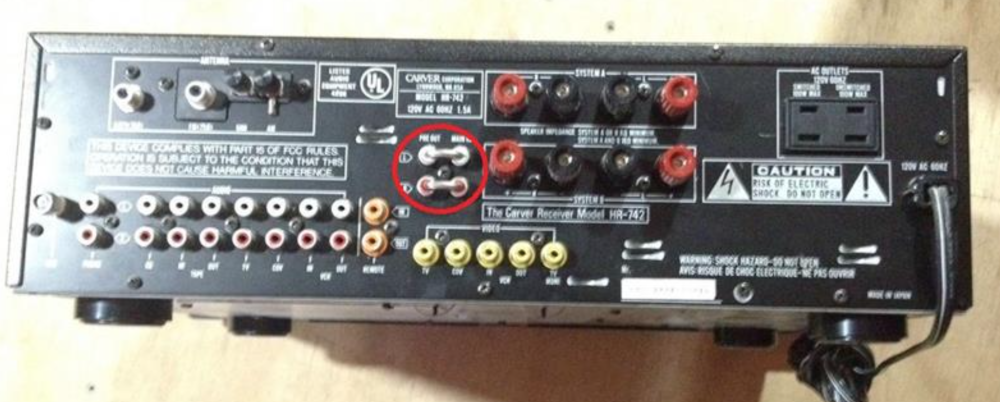
Wwelcome to TCS. Glad you found us. The 742 is a nice receiver. There are so many ways to hook up a subwoofer, that subwoofer makers almost always document how in their Sub Woofer Owner's manual - that is to say, usually multiple options, outlined with diagrams and figures, that you then match to how your receiver outputs look. (If subwoofer manufacturers didn't do this, lots of subwoofers would be returned...,) - I know it's confusing, and linearly, we look at outputs and inputs, and look for the connections that way. And, subwoofers have multiple configuration options between manufacturers - so it's hard to give you an immediate answer. If your sub takes line-level input, many will just say "get a 'Y' cable and split your outputs - and on the 742, that involves pulling the jumpers off the back, and splitting, then re-connecting, with the Y cable. Those "horseshoe" in-n-out connectors take the pre-amplifier output, and direct it right back into the 742's Amplifier stage. Circled in red, below. AND, that is only one way. Your sub (I don't know what you have) may also take SPEAKER LEVEL input - (again, refer to your sub owners manual) in which you could send the speaker outputs directly into the subwoofer, then connect your speakers to the back of your sub - in the pass-through to allow the sub's crossover to pull off the low frequencies, and send only the higher frequencies to your JBLs. Again, I strongly recommend looking at the sub's owner's manual. If you have your subwoofer manual - check it out. If you don't
-
-
Hello Ray, and welcome to thecarversite.com Glad you found us! I can't answer your questions, but I'm sure more information about your sub would help. Does it have L/R inputs and outputs, does it have its own power amp, make/model, that sort of thing. I've never owned a Carver Receiver, and I'd never seen one until last week. I have Carver preamps, and I hook the powered subs I have up to the second set of outputs. If your sub isn't powered, that should work for you. If your sub is powered, I don't know if that's wise or not. I'm not much help, and hopefully someone who's more experienced with Carver Receivers will have the answers you seek.

-
Hi everyone, I am new to Carver. My father passed away a few years ago, and my mom a few weeks ago. So my wife and I have moved into my inherited family home where my father had a Carver HR-742 stereo receiver that was still in the house. Since the movers dropped my Kenwood stereo receiver, I've just hooked up the carver to my office computer sound system, where it is currently driving a pair of JBL Control 1x bookshelf speakers. These little speakers would probably benefit from a sub, and I happen to have one handy, but I don't see a subwoofer output on the back of the HR-742. Can anyone suggest a good way to hook up the sub? The right channel seems to be quite noisy too, so I'm interested in hearing thoughts on what might be causing that and how to fix it. Thanks!
-
Welcome @MARQ528. Many of us here have that "pulled it out from the garage" story, and it sparks a renewed interest in OCCD ... OK, on the button - that has come up before - those little "caps" over the contact switch have little plastic parts hidden behind the faceplate that get brittle, and can allow the cover to pop off. I believe some have generated a 3D printer cap and then glued? it on or attached it somehow. I didn't do it, so I can't help with the printer-file. ...but you are on the right track.
-
Love the DR. 😉
-
Good Morning .. Hello new friends, joining today after pulling my old CT-6 and TFM-15 from the garage, great to be enjoying again after about 30 years. Needed some refurb work which was done by George Meyer here in L.A. but sounds great and happy. Have new speakers arriving today and excited. I have been out of this world for about 30 years so a lot of new things to learn (I’m behind on speakers) but glad to see the old too, and happy the carver is still great. I was 18 when I last used this system, so budget was Energy RC-10 which are toast now. So I tried sonus faber lumina II amator, not enough. I now have Revival Audio Atalante 3 coming today. Excited to try those. I do like the technological breakthrough of the wiim ultra which lets me bring the entire world of music to my carver, very different from 30 years ago. Of course, the button cap on the ct-6 is missing. Wondering if anything developed after some of the old threads I found. Someone at my office has 3D printing capabilities and could print for me if we had the file. I’d be happy to make a few extra. Nice to meet you all. Mark.
-
Marion Harris When I Hear That Jazz Band Play (Single - 1917)
-
Wakiki Hawaiian Orchestra My Hawaiian Wakiki Mermaid Hula (Single - 1917)
-
Handy's Orchestra Of Memphis That "Jazz" Dance (Everybody's Crazy About) Single - 1917)
-
Sally Hamlin Our Hired Girl (Single - 1917)
-
Rosa Pixinguinha (Single - 1917)
-
Billy Murray & The American Quartet Over There (Single - 1917)
-
Original Dixieland Jazz Band Livery Stable Blues (Single - 1917)
-
Marion Harris Everybody's Crazy About The doggone blues But I'm Happy (Single - 1917)
-
Snooks Friedman & His Memphis Stompers Kansas City Blues (Single - 1928)
-
Keane Hopes And Fears (Album )
-
Geroge Gershwin Jaz -O-Mine (Single - 1917)
-
Jaudas' Soceity Orchestra The Jazz One Step (Single - 1917)
-
James Gerard Watson The Gernab Peril (Single - 1917)